|
Page Controller Pattern in
ASP.NET
Problems with Page
Controller Design
GUI Unit Testing
Page Controller Pattern in ASP.NET
The code-behind architecture is a page controller based design, where by
controller we mean the components that control the rendering of the HTML, which
in the case of ASP.NET web forms are the code-behind classes.
Each page has a code-behind class, and the URL requested by the client is
directly handled by individual pages. Any button or server control causing
postbacks (such as a DropDownList control) is handled directly by the page
code-behind class. So understanding the page life cycle is very important in a
page controller based architecture. Here is a diagram that shows how a page
controller pattern works in ASP.NET:
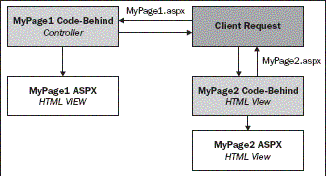
So for every page, its code-behind will act as a controller and handle all
requests, and return processed HTML to the client browser.
Problems with Page Controller Design
In the page controller design we have a controller for each distinct page in our
application (a separate code-behind class having all of the logic that fi res
sequentially as each page loads according to the ASP.NET page life cycle). So
for big projects, there could potentially be a lot of code in the code-behind
fi les, creating problems in code maintenance and support.
GUI Unit Testing
Separating business logic and data access code from the GUI is one of the steps
leading towards a better design. In the previous chapters, we saw how to
implement a basic n-tier architecture using tiers and layers to achieve loose
coupling. But testing the application, especially the GUI and the code-behind
classes in a page controller based model, is very diffi cult because the only
way to test something like a button click's code-behind event handler is to
click the button itself! This means that if we put more and more code in
code-behind classes (which inevitably becomes the case in large web
applications with lots of UI controls), we will not be able to run unit tests
on the UI code. So the only way to test the application would be to manually
test the GUI. The page controller based design does not support unit testing,
and we would not be able to use automated unit testing tools such as NUnit,
MBUnit and so on (which we can easily use to test the other layers such as BL
and DAL).
<<Previous
Next>>
More Related links
ASP.NET Caching
Interview questions with answers
Define Caching in ASP.NET | Advantages of Caching | What are
the types of Caching in ASP.NET? | Explain in brief each kind of caching in
ASP.NET.
ASP.NET Globalization-Localization questions
with answers
What is Globalization and Localization in ASP.NET? | What are
the Globalization approaches possible in ASP.NET? | Implementing ASP.NET
Globalization | Define Resource Files and Satellite Assemblies
ASP.NET Session
State Management questions with answers
Define Session, SessionId and Session State in ASP.NET. |
What is Session Identifier? | Advantages and disadvantages of using Session
State Management. | What are the Session State Modes? | Define each Session
State mode supported by ASP.NET.
ASP.NET 2.0 Themes
One of the neat features of ASP.NET 2.0 is themes, which enable you to define
the appearance of a set of controls once and apply the appearance to your
entire web application............
ASP.NET 2.0 Web Parts Framework
ASP.NET 2.0 ships with a Web Parts Framework that provides the infrastructure
and the building blocks required for creating modular web pages that can be
easily customized by the users. You can use Web Parts to create portal pages
that aggregate different types of content, such as static text, links, and
content that can change at runtime..................
|